Page 2 of 3

Getting location of the touchscreen when touched

Posted: Fri Sep 07, 2012 7:50 am
by maxkatz

Put this in Panel component (change type to 'html'):

1)
code
<canvas id="canvas" width="150" height="150"><&#47;canvas>
/code

2)
Create a new JavaScript file:
code
function draw() {
var canvas = document&#46;getElementById("canvas");
if (canvas&#46;getContext) {
var ctx = canvas&#46;getContext("2d");

ctx&#46;fillStyle = "rgb(200,0,0)&quot
ctx&#46;fillRect (10, 10, 55, 50);

ctx&#46;fillStyle = "rgba(0, 0, 200, 0&#46;5)&quot
ctx&#46;fillRect (30, 30, 55, 50);
}
}
/code

3) Add Load event to the page and run this in Custom JavaScript:
draw();

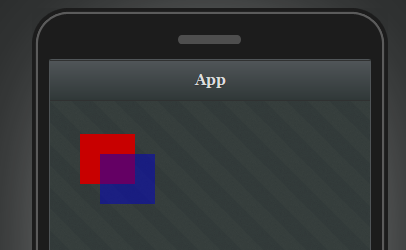
You will see this:
Image


Getting location of the touchscreen when touched

Posted: Fri Sep 07, 2012 10:32 am
by Eric Brouwer

Mat Katz,

Thanks for the reply.

I just had it working.
and wanted to post how i got it working.
But you beat me to it.

However your way does help me though as your way is slightly different as my way.
but same result.

Sorry for the earlier post.
I just did not get it to work and got annoyed.
Should not have take it out on you guys.
my apology.


Getting location of the touchscreen when touched

Posted: Fri Sep 07, 2012 11:38 am
by Ole Henrik Oftedal

Hi Eric!

Glad you fixed it.

You have come to the right place when talking about support. I'm a very beginner myself and Tiggzi support has helped me all the way. They are fantastic! Sometimes they give you a short answer. This could be frustrating but It is also good because It will let you struggle hard to find the solution your way. But when you are near 100% frustrated just drop another question. Few minutes or hours later they are back to help you again. Tiggzi is a great product with outstanding support personnel. I hope this will last forever :-)

Ole
Sandefjord,
Norway


Getting location of the touchscreen when touched

Posted: Fri Sep 07, 2012 1:39 pm
by Eric Brouwer

ok i try to add a picture to the canvas.

code<canvas id="canvas" width="150" height="150"><&#47;canvas>/code

like:

code<canvas id="canvas" width="250" height="350">

<div style="background-image:url(http:&#47;&#47;img1&#46;bdbphotos&#46;com&#47;images&#47;orig&#47;w&#47;x&#47;wx84232zao3x483x&#46;jpg);padding:5px;width:200px;height:300px;border:1px solid black;background-repeat:no-repeat;"><&#47;div>

<&#47;canvas>/code

but the picture does not show up.

What I try to get in the end is that i can tab on the picture and draw a red dot there.

So far i can draw a dot on the canvas where i tab.


Getting location of the touchscreen when touched

Posted: Fri Sep 07, 2012 5:13 pm
by maxkatz

The picture is shown if you put it in a separate div. I'd check the code, when placing inside the canvas whether it's correct.


Getting location of the touchscreen when touched

Posted: Tue Sep 25, 2012 8:24 am
by Maryna Brodina

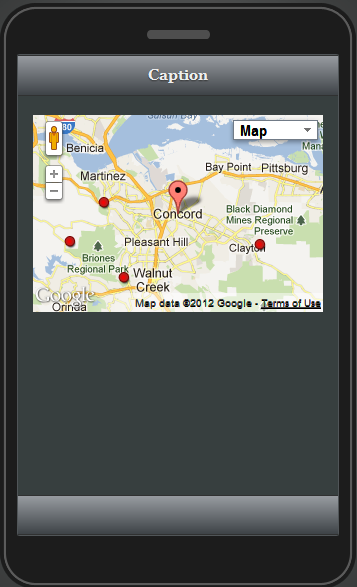
Hello! Please try to put the next code on Load screen:

Tiggr("googlemap1").options.mapElement.live("init",function(evt, map){
google.maps.event.addListener(Tiggr("googlemap1").gmap,"click",function(event){
var markerLocation = event.latLng;//getting location of the touched area
var marker = new google.maps.Marker({ position: markerLocation, title: "Created from click", icon:"http://www.umsystem.edu/media/red/ums..." });
Tiggr("googlemap1").options.mapElement.gmap('addMarker', marker);
});
})

Here is what I get:

Image


Getting location of the touchscreen when touched

Posted: Mon Oct 08, 2012 10:22 am
by Eric Brouwer

Sorry for the late reply,
I had an accident and have been in hospital for a long time.

Thanks for the example.
I see how i can change this so it will work with the way it is needed for my app.

as i need an offline app with load a picture from a folder. then tick on the picture. where it need to place a dot or a marker.


Getting location of the touchscreen when touched

Posted: Mon Oct 08, 2012 11:16 am
by Maryna Brodina

Hello Eric! Hope you feel better!
Let us know if you have any other questions.
Get well soon!


Getting location of the touchscreen when touched

Posted: Mon Oct 08, 2012 2:37 pm
by Eric Brouwer

Hi Marina,

It looks like to me that the above code only works with a google map palette.
I did try to change the google map palette for a picture palette, but this does not work.

what i try to do is loading a picture. then tick on the picture. on the place where i tick on the picture it needs to place a dot.

I feel a lot better then when i was in hospital.


Getting location of the touchscreen when touched

Posted: Tue Oct 09, 2012 3:34 am
by Eric Brouwer

just thinking. is it possible to place a picture over a picture.. then i can find a solution that way