Page 1 of 1

how to get mapped value

Posted: Mon Oct 08, 2012 8:25 pm
by Eric5020946

REST API returns 5 json items, it is mapped to grid items and it generates properly 5 rows which display just fine

grid item is mapped as below:
api_description= label1 text
api_type = label2 text (not visible)
api_name = button text

buttons in each returned row have onclick event that triggers custom JS with alert(), this alert() should display hidden label
how do I call/target hidden label in this row to get its value?

grid is dynamically generated based on data mapping so I can't use html ID, not sure if tiggr('name') would work, if so how?
how to get mapped value

Posted: Mon Oct 08, 2012 9:00 pm
by maxkatz

You could read the value directly, you just need to write a jQuery select to get the right element in the DOM (with your hidden id).

Here is a simpler way, to get this working faster:

1) Use Create Local Storage Variable action on button click
2) In alert(..), simply read the value from local storage.


how to get mapped value

Posted: Mon Oct 08, 2012 9:13 pm
by Eric5020946

Max,

I'm not sure I follow your local storage variable solution...
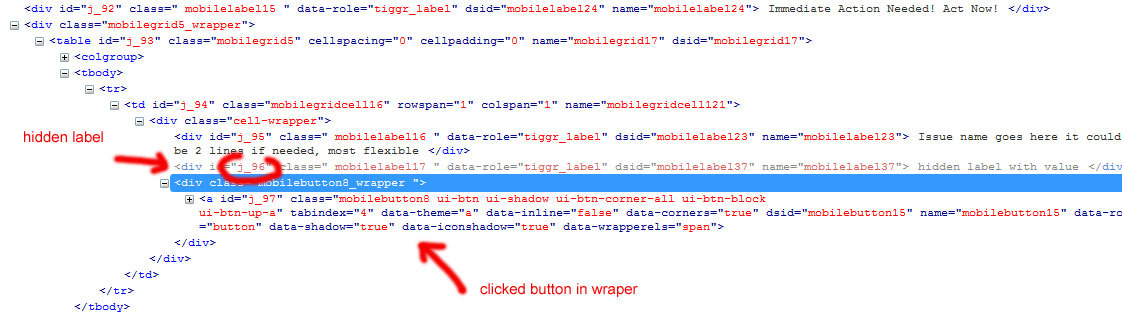
Clicked button just shows me the row but doesn't give me direct access to value of hidden label in that row. All I have is "this" pointing to the button, not label.

I know I can write jquery selector but that's where it gets difficult, I need to make sure that jquery selector targets correct sibling of button wrapper. There are 2 labels (siblings) so how do I target one of them?

It gets even more complicated where there is more than 1 hidden label, in this case how do you create jquery selector with 3 siblings where 2 of them are hidden?

any thoughts? Image


how to get mapped value

Posted: Mon Oct 08, 2012 9:19 pm
by maxkatz

What is the name of the component that holds the hidden label?


how to get mapped value

Posted: Mon Oct 08, 2012 9:21 pm
by maxkatz

Never mind, I see it in the image.


how to get mapped value

Posted: Mon Oct 08, 2012 9:22 pm
by maxkatz

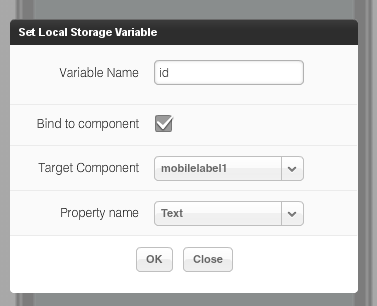
You would do something like this on button click:

Image

instead of 'mobilelabel1', use your label name.

Then, you can run this:
code
alert (localStorage.getItem('id'));
/code


how to get mapped value

Posted: Mon Oct 08, 2012 9:24 pm
by Eric5020946

that would work! haven't seen TARGET COMPONENT dropdown until I clicked bind to component checkbox.. :)

thank you