CraigInDallas
Posts: 0
Joined: Wed Oct 10, 2012 10:23 am

Local Image Asset Full Screen

I have seen a couple of posts that get real close to answering this, but would really appreciate some sample code help.

I have a full screen image that I am loading as a splash screen, loading it and timing it is no problem thanks to the posts. However getting the image full screen is still a problem,
Maryna Brodina
Posts: 0
Joined: Thu Apr 05, 2012 7:27 am

Local Image Asset Full Screen

Hello! Just to clarify - you have a splash screen and while App loads that splash screen doesn't fill full screen size?

CraigInDallas
Posts: 0
Joined: Wed Oct 10, 2012 10:23 am

Local Image Asset Full Screen

Hi Marina,

Thanks for asking.

On my start screen in the load event, I currently have this JS

$('div[dsid="mobilecontainer1"]').css('background-image',
'iphone_splash.jpg')

I have no idea what the correct path should be, and how to set a timer.

Maryna Brodina
Posts: 0
Joined: Thu Apr 05, 2012 7:27 am

Local Image Asset Full Screen

Try this

$('div[dsid="mobilecontainer1"]').css('background-image', 'url("' + Tiggzi.getImagePath("my_image.jpg") + '")');

CraigInDallas
Posts: 0
Joined: Wed Oct 10, 2012 10:23 am

Local Image Asset Full Screen

Thank You much better, however 2 issues left.

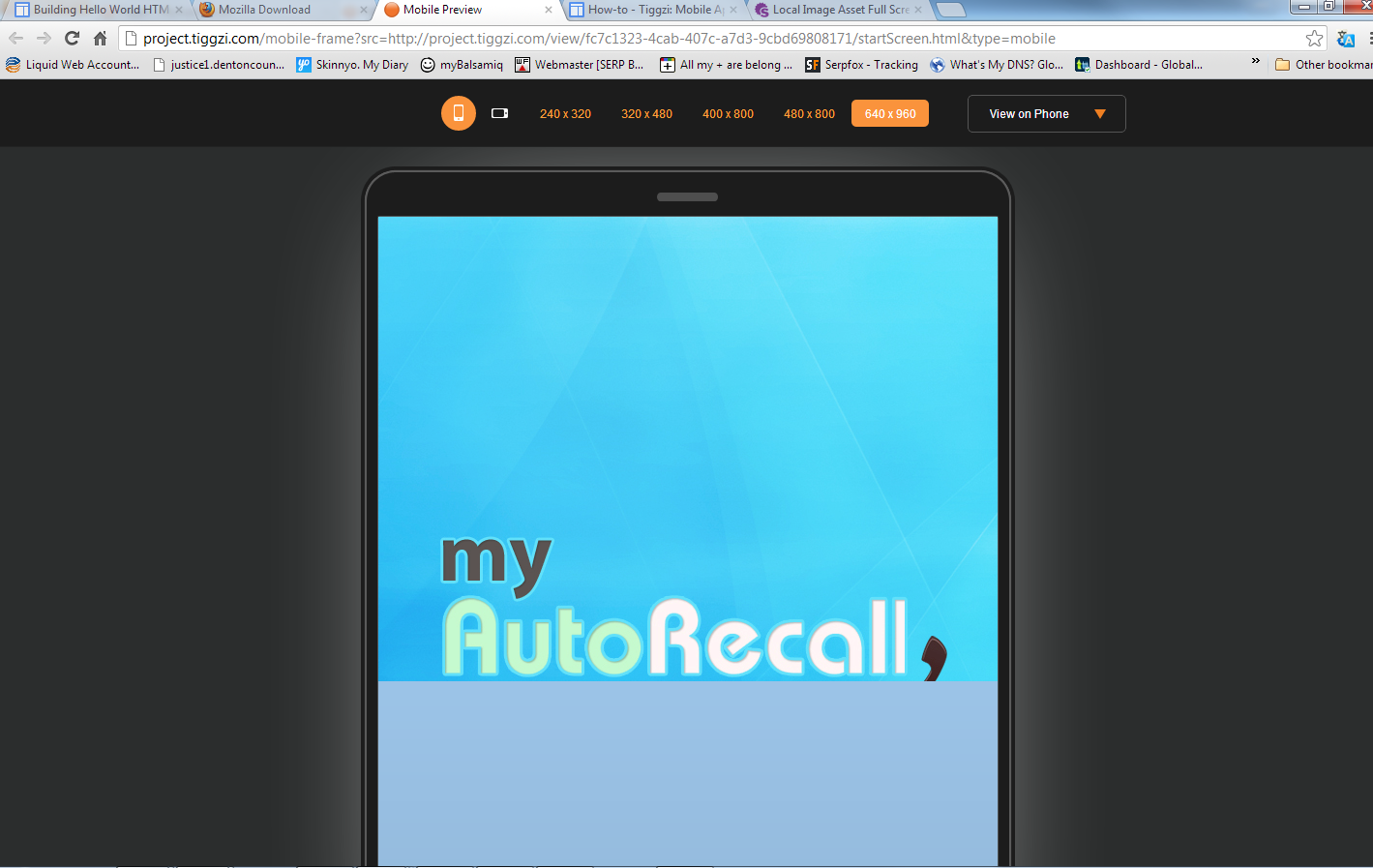
  1. The Image is being cut off about half way down the screen.
  2. How do I set a 3 second timer to go to the next screen
Maryna Brodina
Posts: 0
Joined: Thu Apr 05, 2012 7:27 am

Local Image Asset Full Screen

1) Create custom JS and run it onLoad on spash screen:

var navigateToScreen = function () {
Tiggr.navigateTo('mobilescreen1', {reverse: false});
};

setTimeout(navigateToScreen, 3000);

where mobilescreen1 - is the name of screen where you want to navigate after splash screen

2) What device do you use to test? Could you send us a screenshot where the splash screen cut off?

CraigInDallas
Posts: 0
Joined: Wed Oct 10, 2012 10:23 am

Local Image Asset Full Screen

The timer does not seem to trigger via the web test. here is the code I have in the load:
$('div[dsid="mobilecontainer1"]').css('background-image', 'url("'+Tiggzi.getImagePath("iphone_splash.jpg")+'")');

var navigateToScreen = function () {Tiggr.navigateTo('MyVehicle', {reverse: false});};
setTimeout(navigateToScreen, 3000);

Here is the screen shot of the image being cut halfway down

Image

CraigInDallas
Posts: 0
Joined: Wed Oct 10, 2012 10:23 am

Local Image Asset Full Screen

any thoughts on this?

Maryna Brodina
Posts: 0
Joined: Thu Apr 05, 2012 7:27 am

Local Image Asset Full Screen

Thank's for the screenshot. It's a known issue. We'll fix it.

CraigInDallas
Posts: 0
Joined: Wed Oct 10, 2012 10:23 am

Local Image Asset Full Screen

what about the timer not working?

Return to “Issues”